
On this page
Inspect and capture one asset
Use the CLI as a headless asset compiler and renderer: load one model, item, sound or existing
PNG; inspect it; choose a camera or animation pose; receive media in memory.
These commands ignore ancestor .ashfoxworkspace files. They do not run a project
build, create output folders or change source files.
First capture
After installing the CLI, run these commands in the extracted starter folder:
npx --no-install ashfox capture fox.ashfox --azimuth 45 --elevation 20 --output fox.png
npx --no-install ashfox inspect fox.ashfox
capture writes PNG bytes to stdout. inspect writes JSON. Redirect the output,
pipe it to a consumer, or collect it with your process API. No browser window needs
manual control. Rendering requires Chrome or Chromium; set ASHFOX_CHROME_PATH
when it is not at a standard installation path. An explicit invalid path fails.
Compilation, inspection and ordinary exports do not require Chrome.
The renderer applies the shared scene projection, camera presets, material rules and animation sampling from Ashfox’s rendering library. It starts a private headless process with an ephemeral browser profile and removes that profile on normal cleanup. Sources and captured media are passed in memory. A killed host process can leave an abandoned temporary profile; no asset directory is created implicitly.
For stdin sources, existing PNG bytes, output handling and persistent sessions, see Stdio and memory.
Choose what to see
npx --no-install ashfox capture fox.ashfox --camera front --width 1024 --height 768 --output front.png
npx --no-install ashfox capture fox.ashfox --clip tail_wag --time 0.4 --skeleton --output pose.png
npx --no-install ashfox capture fox.ashfox --wireframe --no-textures --output structure.png
npx --no-install ashfox capture fox.ashfox --node NODE_ID --zoom 1.5 --output node.png
npx --no-install ashfox capture fox.ashfox --texture TEXTURE_ID --scale 8 --output atlas.png
npx --no-install ashfox capture sword.ashfox --stage silhouette --scale 16 --output shape.png
npx --no-install ashfox capture claw_hit.ashfox --variant base --width 640 --height 200 --output waveform.png
Use new filenames when repeating these commands. Find actual node, texture, clip
and variant IDs with inspect; names are also accepted for clips and textures.
Sound capture is a peak-envelope waveform. Use export to receive playable WAV.
Sprite inspection returns the receipt and per-pixel source ownership evidence.
Model inspection returns nodes, texture metadata, animation channels and settings.
inspect --node NODE_ID adds rest-pose subtree measurements and face/UV inspection.
| Option | Accepted values and behavior |
|---|---|
--camera |
perspective (default), native, front, back, left, right, top, bottom; signed presets respect authored forward |
--azimuth, --elevation |
Degrees, −360…360 and −89…89; orbit uses model axes, 0° looks from negative Z, +90° from positive X; elevation is above the XZ plane |
--zoom |
0.1…10, default 1; values above 1 move closer and can crop |
--width, --height |
Integer 16…2048, defaults 640×360 for model/waveform |
--environment |
studio, day, evening, night |
--background |
environment, transparent, checker, light, dark; PNG/sprite defaults preserve transparency |
--clip, --time |
Clip ID/name and seconds; a nonzero time requires a clip and cannot exceed its duration |
--wireframe, --skeleton, --no-textures |
Model inspection overlays and neutral geometry |
--node |
Model node ID; capture isolates its subtree, inspect measures it |
--texture |
Capture one model texture atlas as a PNG |
--scale |
Integer 1…32 for sprites, existing PNGs and atlases; nearest-neighbor scaling, maximum 4096×4096 |
--stage |
Sprite final, silhouette, shade, grain |
--variant |
Sound variant ID; defaults to the first compiled variant |
Orbit options override the direction of the camera preset. When either is given, missing azimuth/elevation defaults to 45°/20°. Model/waveform dimensions and PNG scale are separate controls. Camera controls do not transform source geometry.
Watch a motion or a build replay
npx --no-install ashfox replay fox.ashfox --clip tail_wag > tail-wag.gif
npx --no-install ashfox replay fox.ashfox --mode turntable --duration 3 > turntable.gif
npx --no-install ashfox replay fox.ashfox --mode build --camera perspective > build.gif
Motion and turntable replay accept --fps (1…30, default 10), --duration
(0.01…30 seconds), camera controls and capture dimensions. Motion defaults to the
clip duration; turntable defaults to 3 seconds without a selected clip. Motion
samples advance from --time and wrap at clip duration. Framing is held across
sampled poses instead of following each frame. Limits are 300 frames and 100
million rendered pixels; reduce resolution, duration or frame rate when exceeded.
Build replay uses the browser's canonical reconstruction: geometry, textures, idle motion when available, then completion. It is not a recording of your edit history. This mode uses fixed 640×360 at 10 fps and supports the browser's perspective/native/front/left/right/top camera presets and environments. Custom orbit, timing, overlays and framing options are rejected for build replay. For actual work history, retain each returned revision and its captures in your agent or build system.
Export the selected asset
npx --no-install ashfox export fox.ashfox > fox.glb
npx --no-install ashfox export sword.ashfox > sword.png
npx --no-install ashfox export claw_hit.ashfox --variant base > claw.wav
npx --no-install ashfox export marker.ashfox --format java_block --namespace demo > marker.zip
npx --no-install ashfox export fox.ashfox --format gltf > fox-gltf.zip
Defaults are portable GLB for models, native PNG for sprites and WAV for sounds.
Model --format accepts glb, gltf, java_block, geckolib5, bedrock.
Minecraft formats require --namespace; --model-path overrides the default
entry name. Multi-file formats return a ZIP; GLB returns raw GLB. Target readiness
and compatibility still apply. View settings never alter exported assets.
Configured multi-asset game bundles and sound resource packs use
the project build pipeline.
Compare actual views
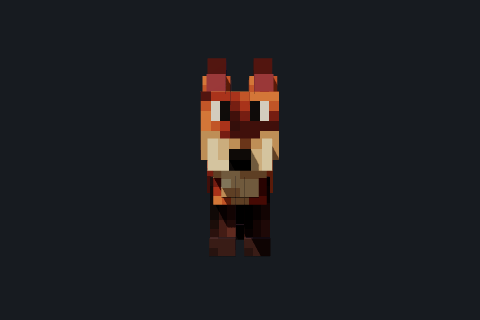
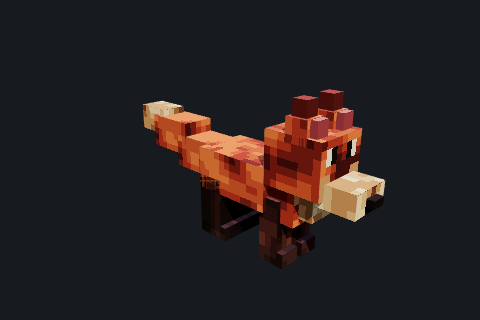
These are captures of the same source. Camera settings change the observation, not the exported geometry. Review and refine explains how to use views and motion when changing an asset.